Categories
E1. Maintain Document Number
Maintain Document Number
Note:
- Sequential Digits (%.5d, xxxxx): Define the length of the running number.
- Reset Frequency: Choose between Monthly (mm/yy/...) or Yearly (yy/...).
- Preview Changes: Always check the sample format before saving.
- Next Number: To set the next running number.
Find the Tools in the top menu bar > select Maintain Document Number

Document Number Listing
select the row you want to modify, e.g. Official Receipt (OR) > click the Edit button

Modify Document Number
Default Format
OR-%.5d -> Generates OR-00009
%.5d = 5-digit sequential number (adjust digit count as needed).

Monthly Reset
Format: mm/yy/xxxxx
The xxxxx (sequential digits) reset every month.

Yearly Reset
Format: yy/xxxxx
The xxxxx (sequential digits) reset every year.

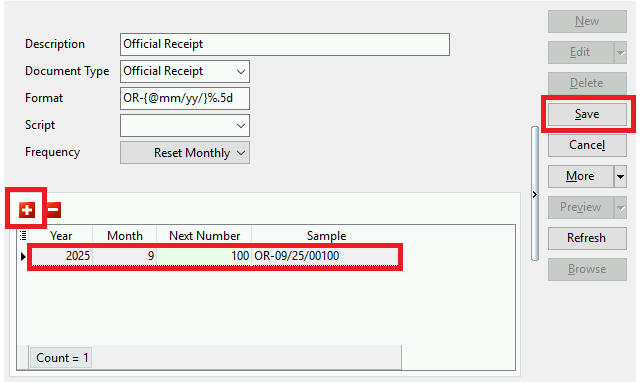
If we want to change new starting number:
click + | fill in year, month and next number (exp: 100)
thus the document number will start with number 100 - 09/25/00100